Every apartment with a console has the same small mess. The controllers live on the couch, slide between the cushions, end up face-down on the coffee table under a pizza box, and one of them is always at 4 percent when somebody finally wants to play. Add a guest controller, a headset and a charging cable that stretches across the rug, and a small living room starts to look like a dorm. A wall holder fixes that for very little money, but in a rental the wall is the hard part: you cannot drill, the paint has to survive move-out, and a controller hanging from the wrong adhesive will drop onto a hard floor sooner or later. This guide covers which no-drill holders actually fit today’s controllers, what those controllers really weigh, how to match that weight to a published adhesive rating with room to spare, where to charge without turning the couch into a hot spot, and how to take everything down without losing part of your deposit.
Shop adhesive controller wall holders on Amazon
Who this is for
- Renters who want PlayStation, Xbox or Nintendo controllers off the couch and on the wall without drilling
- Small living rooms and bedrooms where the console shares space with everything else
- Roommates and families who need every controller charged, labeled and easy to find
- Anyone who has already lost a controller to a cushion, a pet or a coffee spill
Quick answer
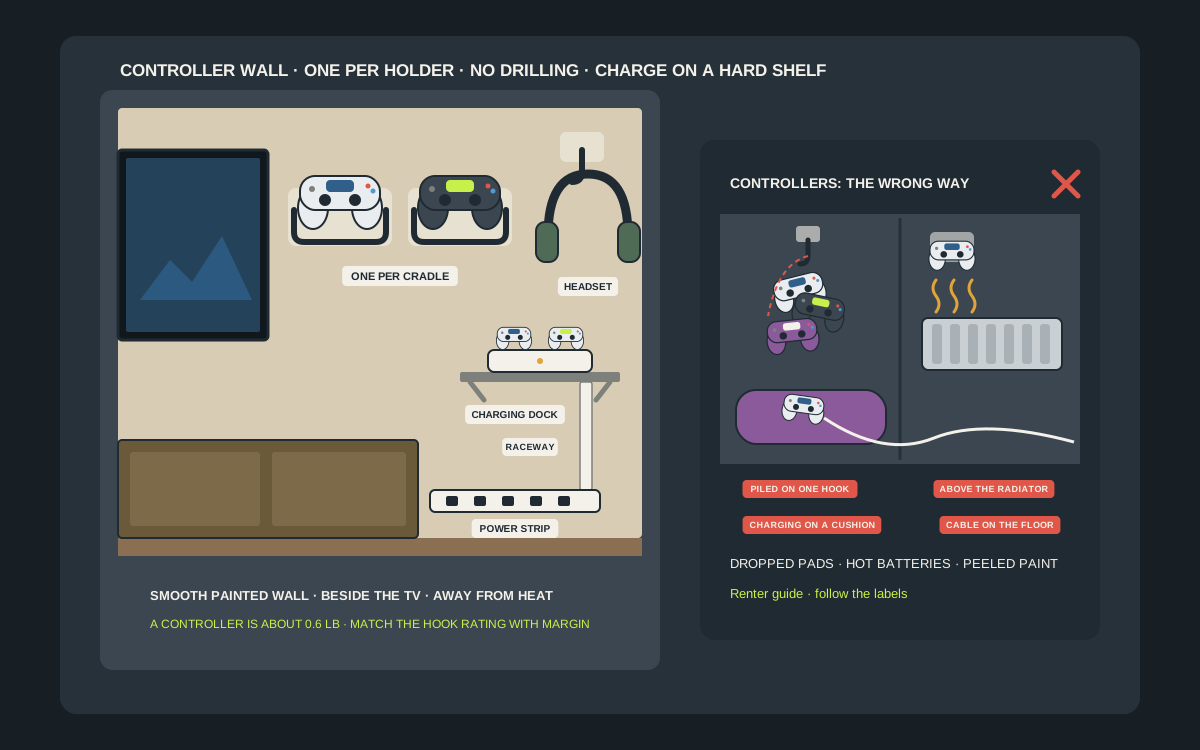
For most apartments, the best under-$50 setup is two universal adhesive cradles, or a pair of Command Medium Utility Hooks rated at 3 lb each, mounted at seated arm’s reach on smooth painted drywall beside the TV, with one controller per holder. Today’s main controllers weigh well under a pound each: Sony lists the DualSense at about 280 g, the Xbox Wireless Controller is around 280 to 290 g with two AA batteries, and Nintendo lists the Switch 2 Pro Controller at about 235 g. Clean the wall with isopropyl alcohol, press every strip firmly, wait before loading, and keep chargers on a small shelf or the TV stand with the cable in a raceway rather than across the floor.
Quick picks
- Best overall: a pair of universal adhesive controller cradles that hold the controller by its grips, stuck to clean, smooth painted drywall at seated arm’s reach beside the TV, one controller per cradle.
- Best for PlayStation 5: a DualSense-shaped wall hanger sold in a two-pack, such as the Brainwavz PS5 holder on pre-fitted 3M VHB tape, because a shaped cradle grips the DualSense’s wide body without pressing on the triggers.
- Best for renters who must leave no trace: Command Medium Utility Hooks, which 3M rates at 3 lb each, with the controller hung by its grip. They are the cheapest option that removes cleanly when you stretch the strip straight down.
- Best for charging: a small adhesive or freestanding shelf that carries a two-controller dock, such as Sony’s DualSense Charging Station at about 180 g, with the cable run down a stick-on raceway to a mounted power strip.
- Best for controller plus headset: a combo hanger that holds a controller on its lower arm and a headset on top, so the whole couch setup lives in one spot on the wall.
- Best when the wall is off-limits: a stick-on cradle on the side of your own TV stand or desk, which keeps the controllers just as tidy and never touches the landlord’s paint.
Quick comparison
| Holder type | Best for | How it holds | Trade-off |
|---|---|---|---|
| Universal adhesive U-cradle | Most two-grip controllers | Grips rest in a U-shaped arm | Often VHB tape; check removal before using on rental paint |
| Console-specific DualSense hanger | PlayStation 5 owners | Shaped cradle fits the wide DualSense body | Fits one controller family only |
| Command Medium Utility Hook | Strict no-trace renters | Controller hangs by one grip; 3 lb rating | Looks plain; controller can swing if bumped |
| Command Large Utility Hook | Controller plus a short cable | Same idea, 5 lb rating | Bigger hook is more visible on the wall |
| Controller and headset combo hanger | One-player couch or desk setups | Lower arm for the controller, top arm for a headset | Combined load; respect the rating |
| Small shelf with a charging dock | Two controllers always charged | Dock sits on a shelf, cable in a raceway | Adhesive shelves carry less than you think |
| Stick-on cradle on your TV stand or desk | Walls you cannot touch | Cradle on furniture you own | Lower and less visible than a wall mount |
| Freestanding controller stand | Textured, brick or wallpapered walls | Upright stand on the media console | Uses surface space; no wall benefit |
PS5 DualSense wall hangersUniversal controller cradlesController and headset combo hangers
What to look for
A cradle that holds the grips, not the triggers
A good controller holder supports the two grips or the body of the controller and leaves the triggers, thumbsticks and shoulder buttons in open air. Holders that pinch the triggers or rest the controller on its sticks put constant pressure on the parts that wear out first. Universal U-shaped cradles fit most two-grip controllers; shaped hangers made for one controller, such as the wide DualSense, sit more securely. If the listing does not show a photo with your exact controller in it, assume it may not fit.
A published weight rating, with real margin
Look for a holder or hook with a stated weight limit, then compare it with what you will actually hang. One DualSense is about 280 g, or roughly 0.6 lb, so a hook rated at 3 lb has plenty of headroom for one controller and a short cable. Ratings are not a challenge to meet. A cradle with no stated rating gets one controller, never a stack of two plus a headset.
Adhesive you can remove at move-out
Command strips and hooks are designed to come off cleanly when you stretch the tab slowly straight down along the wall. Many controller cradles instead ship on pre-fitted 3M VHB tape, which is a much stronger, semi-permanent bond. VHB holds well, but it is not built for damage-free removal and can take paint with it. In a rental, use Command for the wall and save VHB holders for furniture you own, or check your lease first.
Clearance for the charging port
Look at where the controller’s USB-C port sits once it is in the holder. Some cradles block the port, which means taking the controller down every time it needs a charge. Others leave the bottom edge clear so a cable can plug in while it hangs. If you plan to charge on the wall, pick a holder with an open bottom or a cable slot, and keep the cable short.
A smooth, painted surface
Adhesive needs a clean, smooth, sound surface. 3M warns against using Command products on wallpaper and notes they may not adhere well to vinyl, and textured or freshly painted walls make any adhesive less reliable. Command also says to wait at least seven days after painting. If your living room wall is heavily textured, brick or wallpapered, use the side of the TV stand or a freestanding stand instead.
The right height and place
Mount holders where you can reach them from the couch or desk chair without stretching across the TV, out of direct sun, and well away from radiators, heaters and air vents. Command adhesive is meant for indoor use roughly between 50 and 105 degrees Fahrenheit, and 3M notes it can lose adhesion above that. Controllers themselves are happier in the same mild range.
Know your controller before you buy a holder
PlayStation 5 DualSense and DualSense Edge
Sony lists the standard DualSense at about 280 g, or 9.9 oz, with a built-in 1,560 mAh lithium-ion battery and an operating range of 5 to 35 C, or 41 to 95 F. The DualSense Edge is heavier at about 325 g, or 11.5 oz, and comes with its own carry case. The DualSense is wider and rounder than most controllers, which is why a shaped PS5 hanger tends to hold it more securely than a generic narrow cradle. The Edge has swappable stick modules and back buttons, so look for a cradle that does not press on the rear paddles.
Xbox Wireless Controller
Microsoft’s spec sheet for the Xbox Wireless Controller lists about 280 g with two AA alkaline batteries, and independent reviewers measured the Series X|S version at about 287 g with batteries in. It runs on AA batteries or an optional rechargeable pack, so the charging question is different: you are either swapping batteries or plugging in a rechargeable pack. Its body is a little narrower than the DualSense, so most universal U-cradles fit it well.
Nintendo Switch and Switch 2 controllers
Nintendo lists the original Switch Pro Controller at about 246 g and the Switch 2 Pro Controller at about 235 g. Joy-Con 2 controllers are tiny by comparison, around 66 to 67 g each, and are easy to lose. A Pro Controller fits a universal cradle; Joy-Con are better stored in a small adhesive bin or on a Joy-Con grip, which Nintendo lists at about 106 g for the charging grip, than balanced on a hook.
Third-party, PC and arcade controllers
Third-party gamepads range from featherweight to surprisingly heavy, and pro-style pads with metal triggers or extra modules can be heavier than first-party controllers. Weigh yours on a kitchen scale before you choose a hook. Arcade fight sticks, racing wheels and flight sticks are not wall-hook items in a rental; they belong on a shelf, in a closet or under the couch.
Where a controller wall actually works in an apartment
Beside the TV, not behind it
The best spot is the wall right next to the TV or media console, at about the height of your shoulder when you are sitting on the couch. You can grab a controller on your way to sit down and put it back without walking around furniture. Behind the TV is hidden, but you will end up knocking the screen to reach it, and the area behind a TV is usually the warmest spot on the wall.
At a gaming desk
At a PC or desk setup, mount the holder on the wall beside the monitor or on the side of the desk itself, within reach from the chair. Keep it out of the path of the chair back and away from the edge where a sleeve can catch the cable.
In a shared bedroom or studio
In a studio, the gaming corner is often also the sleeping corner. 3M specifically says not to hang Command products over beds, so put controllers on the wall beside the bed or on the side of a dresser, never directly above where someone sleeps.
Places to avoid
Skip the wall above a radiator, baseboard heater or air vent, and skip spots in direct afternoon sun. Heat weakens adhesive, and Sony tells owners not to expose the controller to high temperatures, high humidity or direct sunlight in use or in storage. Skip narrow hallways and door swings too, where a controller sticking out from the wall becomes something to walk into.
Choosing a holder by shape and material
Open U-cradles
The most common design is an open U or fork that the controller drops into, grips first. It is quick to use one-handed, fits most two-grip controllers and leaves the face buttons visible. The trade-off is that a narrow fork can let a wide controller tilt forward, so check the inner width against your controller before you buy.
Shaped, controller-specific hangers
Hangers molded for one controller, such as DualSense-shaped PS5 holders, hold that controller snugly and look tidier on the wall. They are the best choice if everyone in the home uses the same console. If you also own an Xbox or a Switch Pro Controller, a shaped PS5 hanger may not fit it at all.
Hooks
A plain utility hook supports the controller by one grip. It is the least elegant option, but the most flexible: any controller fits, it costs the least, and Command hooks remove the most cleanly. A hook with a slightly upturned tip keeps the controller from sliding off when someone brushes past.
Materials and padding
Most holders are ABS plastic or powder-coated metal, with a few in wood or acrylic. Plastic is light, which leaves more of the adhesive rating for the controller. Metal and wood look sharper but weigh more, so check the holder’s own weight. A soft lining or rubber pad on the contact points stops scuffs on matte controller shells, and it stops a controller rattling against the cradle every time a door closes.
Command hooks, VHB cradles and furniture mounts: the renter trade-off
Command hooks: cleanest removal, plainest look
Command Medium Utility Hooks are rated at 3 lb each and Large Utility Hooks at 5 lb each. A controller hung by one grip on a medium hook is a fraction of that rating. The hook looks utilitarian, and the controller can swing if you bump it, but at move-out you stretch the tab slowly straight down along the wall and the hook comes off. For many renters that single fact decides it.
VHB-backed controller cradles: best fit, hardest removal
Purpose-built cradles look better and hold the controller more securely. The catch is the tape: popular cradles, including Brainwavz models, ship on pre-fitted 3M VHB tape. VHB is an industrial-strength bond meant to stay put. It can be removed, but slowly and with care, and on some painted walls it lifts paint or paper. If you love the look of a dedicated cradle, the safer rental move is to put it on furniture you own.
A cradle mounted on a Command base
A middle path is to mount a lightweight cradle onto a smooth plate or small board you own, then hang that plate on Command Picture Hanging Strips. Command rates its Small strips at 1 lb per set, Medium at 3 lb and Large at 4 lb. Add up the plate, the cradle and the controller, and stay well under the rating of the strips you use. Command also notes its picture strips are not recommended for mounting shelves, so this works for a flat plate with a cradle, not a ledge.
Furniture mounts: zero risk to the wall
Your TV stand, desk and dresser are yours. A stick-on cradle on the side of the media console sits a little lower than a wall mount, but it keeps the controllers just as organized and leaves nothing on the landlord’s paint. It is also the right answer for textured, brick or wallpapered walls where adhesive will not hold reliably.
Charging without a fire-risk tangle
Put the charger on a hard surface
Lithium-ion controllers should charge on a hard, stable, ventilated surface, not on a couch cushion, a bed or under a blanket. Sony’s manuals tell owners to stop using a controller and disconnect cables if it becomes too hot to touch, smells unusual or behaves abnormally, and never to handle a damaged or leaking battery. A small shelf or the top of the media console is the right place for a charger.
Charging docks
Sony’s DualSense Charging Station, model CFI-ZDS1, weighs about 180 g, measures about 52 by 62 by 159 mm, charges up to two DualSense or DualSense Edge controllers and takes about three hours to charge a fully empty DualSense, or about two and a half hours for an Edge. Sony lists an operating range of 5 to 35 C for the station. A dock like that wants a shelf at least as deep as its base, with the plug within reach of an outlet or power strip.
Charging temperature matters
Sony recommends charging the DualSense between 10 and 30 C, or 50 and 86 F, and notes charging may not be as effective outside that range. In practice that means not charging in a cold entryway in winter or on a sunny windowsill in summer. A shelf on an interior wall, away from heaters and windows, keeps the battery in its comfort zone.
Xbox batteries and packs
Because the Xbox controller uses AA batteries or an optional rechargeable pack, keep a small labeled bin for spare charged AAs near the holder, or a charging cable for the pack. If a controller will sit unused for months, take alkaline batteries out; battery makers advise removing batteries from devices that will not be used for a long time, because old cells can leak.
Cables off the floor
Run charging cables up or down the wall in a stick-on cord raceway or with adhesive cable clips, and plug them into a power strip mounted on the side of the console or the wall. A cable stretched across the rug is a trip hazard, and it is how controllers get yanked off holders and onto the floor. Use the cable that came with the controller, or a USB cable that meets USB standards, as Sony advises.
How to mount a no-drill controller holder so it stays up
- Weigh each controller, with batteries, on a kitchen scale and write the number down.
- Pick the holder or hook, and check its published weight rating against one controller plus any cable or headset you plan to hang.
- Choose the spot: smooth painted drywall, beside the TV or desk, at seated arm’s reach, away from heaters, vents and direct sun, not above a bed.
- Confirm the paint is at least seven days old, which is 3M’s guidance for Command products.
- Clean the area with isopropyl rubbing alcohol on a cloth, not a household spray cleaner, and let it dry completely.
- Check that the room and wall are above 50 F, the minimum application temperature 3M gives for Command products.
- Place a strip of painter’s tape as a level line, then press the holder firmly against the wall for at least 30 seconds, covering the whole adhesive area.
- Wait before loading. Command says to wait one hour for its picture strips and hooks; for VHB-backed holders, follow the maker’s cure time, which is often longer.
- Hang one controller, give the holder a gentle downward tug, then leave it for a day before adding the second controller or a cable.
- Check the holder after the first week and again when the heating comes on, which is when adhesive is most likely to creep.
How many controllers can one wall hold?
Do the arithmetic once
Two DualSense controllers are about 560 g, or roughly 1.2 lb. Two Xbox controllers with batteries are about the same. A Switch 2 Pro Controller and a pair of Joy-Con 2 together are under 400 g. These are light loads, which is why adhesive works for controllers at all. The danger is not one controller; it is the slow pile-up of a second controller, a headset, a charging cable and a game case on the same hook.
One controller per holder
The cleanest rule is one controller per cradle or hook. It keeps every holder far below its rating, it means nobody has to unhook one controller to reach another, and it makes a missing controller obvious. For a four-player household, that is four holders in a neat row, not one hook with four controllers dangling from it.
Headsets are the heavy part
A gaming headset often weighs more than the controller it sits beside. If you use a combo hanger, add the headset’s weight to the controller’s and compare the total with the hanger’s rating. If the hanger has no stated rating, give the headset its own holder; our headphone hanger guide covers the options.
Shelves need their own math
An adhesive shelf has to carry the dock, the controllers sitting in it, and the leverage of anything that sticks out from the wall. Read the shelf’s published limit, weigh the full load, and stay well under it. If the shelf has no stated rating, put the dock on the TV stand instead.
Families, roommates and guests
Give every player a spot
Label each holder with a name or a color, or match colored controller skins to colored labels. Assigned spots end the argument about who left a controller dead, because it is obvious whose holder is empty.
Kids’ controllers at kid height
If younger kids play, mount their holder low enough that they can reach it from the floor without climbing on the console or the couch arm. Keep cables and small parts, such as spare stick caps, in a lidded bin out of reach of toddlers; Sony warns that small parts can be a choking hazard for small children.
The guest controller
Most homes have one spare controller that only comes out when friends visit. Store it in a drawer or a small bin, with batteries removed if it is an Xbox controller, and keep the wall for the controllers you use every week.
Shared apartments
In a shared living room, agree on where controllers live before anyone sticks anything to the wall. One tidy row beside the TV looks deliberate. Three different holders in three different styles scattered around the room looks like a dorm, and it means three times the removal at move-out.
Pets, small kids and controllers
Cats
A row of controllers at couch height is an invitation to a curious cat. Cradles that hold the controller securely, rather than balancing it on a hook, survive a paw swipe better. Keep dangling charging cables short and tucked into a raceway, because a swinging cable is the part a cat goes for.
Dogs
Puppies and some adult dogs chew controllers and cables. Mount the holders high enough that the controller and its cable are out of reach of a dog standing on its hind legs, and keep the charging dock on a shelf, not on the floor beside the couch.
Toddlers
For very small children, height is the safety feature. Mount everyday controllers above toddler reach, keep spare stick caps, Joy-Con straps and small parts in a lidded bin, and route every cable so it cannot be pulled from the floor.
Three sample setups
Solo PS5 player in a studio
One DualSense hanger on Command Picture Hanging Strips via a small plate, on the wall beside the TV at seated shoulder height. A Sony charging station on the TV stand with the spare DualSense in it. The DualSense Edge stays in its case in a drawer. Total spend: well under $50, and nothing on the wall but one plate.
Two-player Xbox couch
Two Command Medium Utility Hooks spaced a hand-width apart beside the TV, one controller each. A small labeled bin on the TV stand for charged AA batteries and a rechargeable pack cable. The power strip mounted on the side of the console with its cable in a raceway. Nothing on the wall needs more than a gentle pull straight down to remove.
Family Switch and PS5 setup
Four universal cradles stuck to the side of the media console, labeled by name, with the kids’ cradles at the bottom. Joy-Con 2 in a small adhesive bin on the console. One charging dock on top of the console. The walls stay bare, and the controllers are still off the floor and out of the couch.
Where the $50 goes
Two-controller wall, no-trace
A pack of Command Medium Utility Hooks, a short adhesive cord raceway and a pack of cable clips usually come to well under $25 together. That leaves room in the budget for a power strip mount or spare Command strips for remounting later.
Shaped cradles plus charging
A two-pack of DualSense hangers plus a raceway and a mounted power strip sits comfortably under $50 at typical prices. A first-party charging dock is a separate purchase that can take a big share of the budget on its own, so if money is tight, start with the USB cable that came with the console and add a dock later.
Four-player furniture setup
Two two-packs of universal cradles stuck to the side of the media console, plus labels and a small lidded bin for small parts, keeps a four-player household under $50 with nothing on the walls at all. Prices change often, so check the current price on the listing before you buy.
Keeping controllers and holders clean
Wipe with a soft, dry cloth
Sony advises wiping the DualSense with a soft, dry cloth and not using insecticides, solvents or chemically treated cloths on it. For the DualSense Charging Station, Sony also says not to use thinner, benzine or alcohol, and not to let rubber or vinyl sit against the product for long periods. Keep a microfiber cloth near the holder and give the controllers a wipe when you put them back.
Dust the holder too
A holder by the TV collects dust, and dust ends up in the charging port. Wipe the cradle when you wipe the controller. If a connector looks dusty, Sony’s manual says to clean it with a dry cloth before charging.
Watch for wear
Check the adhesive edge every few months. A hook that has started to peel at a corner, a strip that has stretched, or a cradle that has tilted is telling you it is time to remove it and remount with fresh adhesive, not to add another controller.
What a wall holder will not fix
Battery wear
Sony notes that a controller battery has a limited lifespan, that battery duration gradually decreases with use and age, and that battery life also varies with how it is stored. A holder keeps controllers out of the couch and away from heat, which helps, but it cannot make an old battery hold a charge like a new one.
Stick drift and worn buttons
Hanging a controller correctly avoids pressure on the sticks and triggers, but it does not repair drift or worn buttons. If a controller has developed drift, check the maker’s support pages and warranty before you buy a replacement.
A bad wall
No adhesive fixes crumbling plaster, peeling paint or a heavily textured surface. If a test hook peels within a week, the wall is telling you to use the furniture-mount or freestanding option instead.
Moving out: removing holders without losing your deposit
Command hooks and strips
Take the controller off, then pull the stretch tab slowly straight down along the wall, keeping it flat against the wall. Command’s instructions say never to pull the strip toward you, and to keep stretching, sometimes as much as 15 inches, until the strip releases. If a tab breaks, 3M’s guidance is to work dental floss behind the adhesive rather than pry the hook off.
VHB-backed cradles
Remove VHB slowly. Warming the tape gently with a hair dryer on low softens the bond, and working floss or fishing line behind it in a sawing motion separates it from the wall. Go slowly at the paint edge. Then roll off the remaining residue with your thumb or a dedicated adhesive remover that is safe for paint, testing it in a hidden spot first.
Touch up honestly
If paint lifts, it is far cheaper to touch up a small patch with matching paint than to lose part of a deposit. Ask the building for the paint color early, or check your move-in photos, and keep the original photos of the wall to show its condition before you mounted anything.
How to set it up in an afternoon
- Gather every controller in the home, including guest controllers and anything in drawers, and decide which ones live on the wall and which go in storage.
- Weigh each one and note whether it charges by cable, dock or batteries.
- Decide the location: wall beside the TV or desk, or the side of your own furniture if the wall is off-limits.
- Buy one holder per everyday controller, plus a raceway or cable clips and, if needed, a power strip mount.
- Clean and dry the mounting area with isopropyl alcohol, mark a level line, and mount the holders a hand-width apart.
- Wait for the adhesive to set, then load one controller per holder and route any charging cable through the raceway.
- Put the charging dock or battery bin on a hard shelf or the TV stand, within reach of the holders.
- Label each holder, take a photo of the wall for your move-out file, and check the holders again after a week.
Mistakes to avoid
- Hanging two or three controllers and a headset from a single hook or cradle.
- Sticking VHB-backed holders straight onto rental paint without checking how they come off.
- Mounting on textured walls, wallpaper or vinyl, where 3M says adhesive may not hold.
- Loading a holder immediately instead of waiting for the adhesive to set.
- Choosing a cradle that presses on the triggers or rests the controller on its thumbsticks.
- Charging controllers on a couch cushion, bed or blanket.
- Mounting holders above a radiator, heater, vent or a sunny window.
- Running a charging cable across the floor where feet and pets can catch it.
- Hanging controllers directly over a bed, which 3M specifically warns against for its products.
- Leaving alkaline batteries in a guest controller that sits in a drawer for months.
Related guides
Browse the hub: No-drill apartment storage under $50 - all guides
- Best Adhesive Remote Caddies Under $50 for Apartments
- Best Adhesive Headphone Hangers Under $50 for Apartments
- Best Adhesive Phone Charging Wall Shelves for Apartments Under $50
- Best Adhesive Power Strip Wall Mounts for Apartments Under $50
- Best Adhesive Cord Raceway Kits for Apartments Under $50
- Best Command Hooks for Apartment Storage Under $50 (No Drill)
- Best No-Drill Laptop Wall Shelves & Vertical Holders for Apartments Under $50
FAQ
Will Command hooks hold a game controller?
Yes, with room to spare. 3M rates Command Medium Utility Hooks at 3 lb each and Large Utility Hooks at 5 lb each. A DualSense is about 280 g, roughly 0.6 lb, and an Xbox Wireless Controller with batteries is about the same. Hang one controller per hook, mount on clean, smooth painted drywall, and wait before loading.
Are adhesive controller holders safe for rental walls?
Command hooks and strips are designed for damage-free removal when you stretch the tab slowly straight down along the wall. Many dedicated controller cradles use 3M VHB tape instead, which is stronger but semi-permanent and can lift paint when removed. In a rental, use Command-based mounts on the wall or put VHB cradles on furniture you own.
How much does a game controller weigh?
Sony lists the DualSense at about 280 g and the DualSense Edge at about 325 g. Microsoft lists the Xbox Wireless Controller at about 280 g with two AA batteries. Nintendo lists the Switch Pro Controller at about 246 g, the Switch 2 Pro Controller at about 235 g and each Joy-Con 2 at about 66 to 67 g.
Can I charge a controller while it hangs on the wall?
Only if the holder leaves the charging port clear and the cable can run neatly down a raceway to a power strip. Many people find it simpler to charge on a dock on the TV stand or a small shelf. Charge on a hard surface, never on a cushion or bed, and Sony recommends charging the DualSense between 10 and 30 C.
Where is the best place to mount a controller holder?
Beside the TV or desk, at about shoulder height when you are seated, on smooth painted drywall. Avoid walls above radiators, heaters and vents, spots in direct sun, door swings and the wall above a bed, which 3M advises against for its products.
How do I remove a controller holder at move-out?
For Command hooks, pull the stretch tab slowly straight down along the wall and never toward you; it can take up to 15 inches of stretch. For VHB tape, warm it gently, saw behind it with floss or fishing line, and roll off the residue. Touch up any lifted paint with matching paint.
Bottom line
The best under-$50 controller wall for an apartment is simple: one holder per controller, a published weight rating far above the roughly 0.5 to 0.7 lb a modern controller weighs, and adhesive you can actually remove at move-out. Command hooks are the cleanest choice on rental paint, shaped cradles look best on furniture you own, and chargers belong on a hard shelf or the TV stand with the cable in a raceway. Mount it beside the TV at seated arm’s reach, away from heat and sun, and the controllers stop disappearing into the couch.