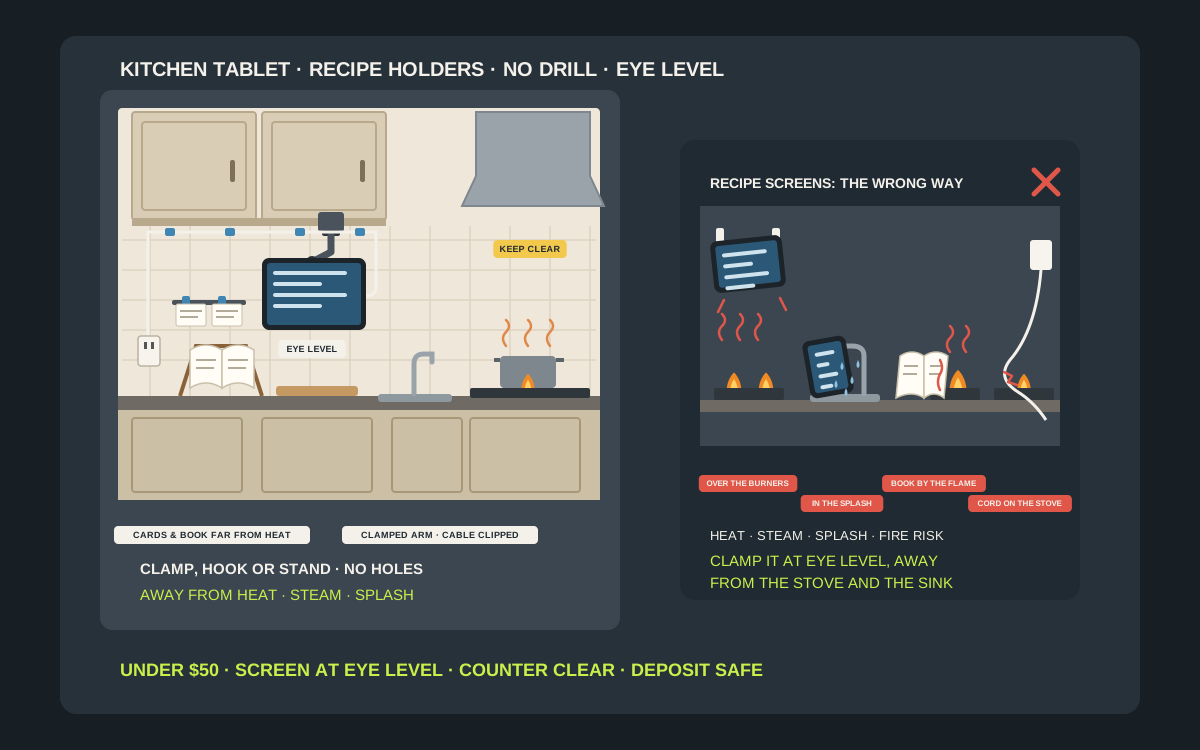
Most people cook from a screen now. The recipe is on a phone or a tablet, and in a small rental kitchen that screen ends up leaning against the backsplash behind the cutting board, balanced on the toaster, propped against the fruit bowl or lying flat on the only clear patch of counter, where it gets flour on it, gets knocked into the sink or sits a few inches from a hot pan. The old cookbook has the same problem with less counter to share, and the handwritten recipe cards live in a drawer because there is nowhere to stand them up. The fix does not need a drill. A clamp-on arm under an upper cabinet, a holder that hooks over a cabinet door, a magnetic mount on the fridge or a simple folding stand puts the screen at a height you can read, out of the splash zone and off the counter you need for chopping. This guide covers which kind of holder suits your kitchen, where the screen and the paper belong, how to keep a tablet away from heat, steam and water, how to keep it clean while you cook with messy hands, and how to do all of it without leaving marks your landlord will charge for. It sticks to holders that usually cost under $50.
Shop under-cabinet tablet holders on Amazon
Who this is for
- Renters who cook from a tablet or phone and are tired of propping it against the backsplash
- Small apartment kitchens with very little counter, where every square inch is prep space
- Home cooks who still use a favorite cookbook or a box of handwritten recipe cards
- Anyone whose lease rules out drilling into the cabinets, the tile or the walls
Quick answer
For most apartment kitchens with upper cabinets, the best under-$50 tablet holder is a clamp-on arm that grips the front lip or edge of an upper cabinet or open shelf, with no screws, so the screen hangs at eye level over the prep area and swings away when you are done. If your cabinets have no edge to clamp, use a holder that hooks over a cabinet door near the prep area, a magnetic mount on a fridge door that actually holds a magnet, or a folding countertop stand at the end of the counter farthest from the stove. Keep the screen out of the stove’s heat and the sink’s splash, route the charging cable along the cabinet instead of across the counter, and give paper cookbooks and recipe cards their own stand or rail well away from the burners. Check the clamp range, the device sizes and the current price on the listing before you buy.
Quick comparison
| Setup | Best for | How it holds | Trade-off |
|---|---|---|---|
| Clamp-on under-cabinet arm | Kitchens with an upper cabinet lip or open shelf edge | Clamp grips the edge, arm holds the tablet at eye level | Needs an edge within the clamp range |
| Screw-in under-cabinet mount | Owners, or renters with written permission | Plate screws to the cabinet underside, arm folds away | Leaves screw holes in the cabinet |
| Over-cabinet-door holder | Renters with a cabinet door beside the prep area | Hooks over the top of the door, cradle on the front | Door must still close; pad the hook |
| Magnetic fridge mount | Fridges with a door that holds a magnet | Magnet base on the door, metal plate on the case | Many stainless fronts are not magnetic |
| Adhesive wall ledge or cradle | Phones and small tablets on smooth, clean walls | Lipped ledge on adhesive strips, device rests in it | Adhesive is not made for valuables |
| Folding countertop stand | Any kitchen, any lease | Freestanding easel with a lip or page clips | Uses some counter space |
| Recipe card rail or clips | Recipe cards and printed recipes | Clips or a slot hold cards upright on the wall | Keep paper far from the stove |
| Inside-door recipe pocket | A few favorite cards and printouts | Pocket on the inside of a cabinet door | Only holds a handful of cards |
Clamp-on cabinet tablet armsCookbook and tablet standsRecipe card holders
What to look for
A secure grip on the device, not just a ledge
A tablet is expensive, and in a kitchen it falls onto tile, into a sink or onto a hot pan. Look for a cradle with spring-loaded or screw-down jaws, deep corner clips or a ledge with a raised lip that the tablet cannot slide off when you tap the screen with a wet knuckle. Check that the jaws fit your tablet in its case. Barkan, for example, lists a maximum tablet thickness including the case of 0.6 inch, or 15 mm, for its T72 tablet mount, and a rugged case can easily be thicker than that.
A clamp range that fits your cabinet
Clamp-on arms grip an edge, so the first measurement is the thickness of whatever they will grip: the front rail or lip under an upper cabinet, an open shelf or the edge of a wire rack. Eaton’s Tripp Lite DDR0710SC tablet clamp, for example, is specified for flat surfaces up to 1.6 inches thick and can be mounted upside down under a cabinet to read recipes at eye level. Measure your edge with a ruler before you buy, and look for a clamp with rubber or felt pads so it does not mark the cabinet finish.
A weight rating above your tablet in its case
Tablets are heavier than they look once a case goes on. Apple lists the Wi-Fi iPad (A16) at 1.05 pounds, the 13 inch iPad Air (M4) at 1.36 pounds and the iPad mini at about 0.65 pounds, before any case. The same Tripp Lite clamp is rated for tablets up to 2.2 pounds and screens from 7 to 10 inches, while Barkan rates its T72 for 7 to 14 inch tablets up to 3 pounds. Weigh your tablet in its case on a kitchen scale and compare it with the published rating on the listing.
Adjustable height and angle
A recipe is easiest to follow when the screen sits roughly at eye level and tilts toward where you stand, not toward the ceiling light. Look for a holder with a ball joint or a hinged arm so you can tilt it away from glare, rotate between portrait and landscape and swing it up out of the way when you need the space under the cabinet. A holder that folds flat also keeps a sharp corner out of your path when you are not using it.
No drilling, no damage
Renters need holders that come off cleanly. Clamp-on arms, over-door hooks, magnets and freestanding stands leave no holes at all. Adhesive holders can work for light things on smooth surfaces, but they need careful surface preparation, they can pull paint when removed carelessly, and adhesive makers do not want them trusted with anything valuable. Keep the instructions for any adhesive product, because they explain how to remove it without damage.
Somewhere for paper, too
If you still cook from a cookbook or recipe cards, give them a place of their own. A folding cookbook stand with page clips holds a heavy book open, and a slim rail or row of clips holds a few recipe cards upright on the backsplash or the side of a cabinet. Standard recipe cards are usually 3 by 5 or 4 by 6 inches, so check that the clips or slots suit your cards. Paper burns, so this is one part of the kitchen where placement matters as much as the holder.
Know what you are holding
Full-size tablets
A full-size tablet in a case is the heaviest and most valuable thing in this guide. Apple’s own figures put the Wi-Fi iPad (A16) at 1.05 pounds, the 13 inch iPad Air (M4) at 1.36 pounds and the 13 inch iPad Pro (M5) at 1.28 pounds, and Android tablets of similar size weigh about the same. Add a folio or rugged case and you can be well over a pound and a half. That is light for a clamp arm with a real rating, but it is far too much to trust to a holder that only has a guess for a weight limit.
Small tablets and phones
An iPad mini is about 0.65 pounds, and most phones are lighter still. Small devices are easier to place: they fit a narrow ledge, a small magnetic mount or a compact stand. The trade-off is screen size. Recipe text that is easy to read on a 13 inch screen at arm’s length is small on a phone across the counter, so a phone holder should sit closer to where you work, or you should turn up the text size in the recipe app or browser.
Cookbooks
A cookbook is the opposite of a tablet: cheap to replace for most people, but heavy, floppy and flammable. A thick hardback can weigh more than a tablet, it needs a stand with a solid back and clips to hold the pages open, and its pages catch spatter. If the book matters to you, a clear acrylic or plastic page shield on the stand keeps sauce off it, and a stand at the far end of the counter keeps it away from the heat.
Recipe cards and printouts
Handwritten cards are often the most precious recipes in the house, and they are the easiest to ruin with a splash. Keep the original in a drawer or box and cook from a copy in a plastic sleeve, or photograph it so you can cook from the screen. Cards and printouts need only a light holder: a clip, a slot or a small rail. Their risk is not weight, it is heat and water.
Check your kitchen before you buy
The underside of the upper cabinets
Open a cabinet and look at the front edge of its bottom from below. Many cabinets have a face frame, a solid rail around the front, and many have a lip that hangs below the cabinet floor to hide under-cabinet lights. Either can give a clamp something to grip. Frameless cabinets with a perfectly flat underside give a clamp nothing to hold, so they usually need a screw-in plate, which means asking the landlord, or a different kind of holder. Measure the thickness of the edge you plan to clamp and the space between the counter and the cabinet.
Cabinet doors beside the prep area
An over-door holder hooks over the top edge of a cabinet door, so it needs a door near where you chop and stir, a gap at the top of the door when it closes, and a door that still closes properly with the hook in place. Check the thickness of the door against the hook size listed for the holder. Remember that the screen moves every time someone opens that cabinet, so it works best on a door you rarely open while you cook, such as the one over the fridge or a corner unit.
The fridge door
A magnetic mount needs a fridge door that holds a magnet. Many painted fridge doors do, but many stainless steel fronts do not, so test the spot with a fridge magnet before you buy. Look also at what is between the fridge and the prep area: a mount on the side of the fridge is only useful if you can see it from the cutting board. Check that the fridge door still opens fully and that the tablet does not hit the counter or the wall when it swings.
The backsplash and the walls
If you are thinking about any adhesive holder, look closely at the surface. Smooth, glazed tile and smooth painted walls are the best candidates. Textured paint, grout lines, wallpaper, brick and stone are poor ones. Command’s picture hanging strip instructions say to clean the surface with rubbing alcohol, not household cleaners or water, to use the strips indoors between 50 and 105 degrees Fahrenheit, to wait seven days after painting and not to use them on wallpaper. A backsplash behind a stove or a kettle is exactly the warm, steamy spot where adhesive struggles.
The counter and the outlets
Look at the counter you actually use for prep, usually the longest stretch between the sink and the stove, and note where the nearest outlet is. The holder should sit beside that stretch, not over it, so the screen does not take the cutting board’s space. If the only outlet is next to the sink, plan to charge the tablet before you start cooking and route any cable away from the basin rather than across it.
Where the screen belongs
Eye level, beside the prep area
The best spot is at about eye level, just to one side of where you chop, so a glance up shows the next step without bending over the counter. Under an upper cabinet at the end of the prep counter is ideal. Avoid putting the screen directly over the cutting board, where you will hit it with your elbow and catch it with flour, and avoid positions that make you turn your back on the stove to read.
Away from the stove
Heat and grease are the main threats. Apple says to use iPad where the surrounding temperature is between 32 and 95 degrees Fahrenheit, or 0 to 35 degrees Celsius, and the area right above a burner or beside an oven vent gets hotter than that when you cook. Fire safety agencies say the same thing for a different reason: the National Fire Protection Association advises keeping anything that can catch fire, including oven mitts, wooden utensils, food packaging, towels and curtains, away from the stovetop. A tablet case, a cookbook and a recipe card all count.
Away from the sink and steam
Water and steam are the next threats. Apple’s handling advice for iPad says to keep it away from liquids, oils and acidic foods and to avoid dramatic changes in temperature or humidity. The splash zone around a sink is wider than it looks once you rinse a pot, and a kettle spout, a rice cooker vent, a coffee maker or a dishwasher door all puff out steam. Keep the screen at least an arm’s length from the faucet and out of the plume of anything that steams.
Out of reach of knives and kids
A tablet that hangs where you swing a chef’s knife or a hot pan will get hit. Leave space between the screen and the magnetic knife bar, and keep a dangling arm out of the path from the stove to the sink. If you share the kitchen with children, the National Fire Protection Association recommends a kid-free zone of at least 3 feet around the stove, and a tablet showing a cartoon is a reason for a child to walk into it, so put the screen somewhere they can watch from a stool, well away from the burners.
The no-drill options in detail
Clamp-on arms under a cabinet or shelf
This is the most useful option in a rental with upper cabinets or open shelving. The clamp grips the front rail or lip of the cabinet, or the edge of a shelf, and an arm holds a cradle at the end. Tighten the clamp by hand until it is firm, then pull on the arm gently to be sure it will not slide. Put a strip of felt or the pads from the box between the clamp and the cabinet to protect the finish. An arm that swings up or folds flat lets you clear the space when you are done.
Over-cabinet-door holders
An over-door holder is a hook that rests on the top edge of a cabinet door with a cradle or shelf on the front. It needs no tools and moves easily to another door. The hook can rub paint off the top of the door, so stick a small felt pad or a strip of painter’s tape on the inside of the hook. Do not use it on a door that swings into the path of the stove, and close the door gently, because the tablet swings with it.
Magnetic mounts on the fridge
A magnetic mount usually pairs a strong magnet on the holder with a thin metal plate that sticks to the back of the tablet case. On a fridge door that holds a magnet, it is quick to put on and take off. Test the grip with the tablet in its case before you trust it, keep the plate on the case rather than the tablet itself, and keep the mount out of the path of the freezer door. Keep bank cards and hotel key cards away from strong magnets.
Adhesive ledges and cradles
Adhesive holders are tempting because they are cheap and sit flat on the wall, but a tablet is exactly the kind of item adhesive makers warn about. Command’s picture hanging strip instructions tell you not to hang valuable or irreplaceable items, and Command’s own help pages note that regular strips may not perform as well in humid areas. If you use an adhesive ledge at all, use it for a phone or a small, light tablet, choose one with a deep lip, put it low over a counter rather than over a hard floor, and keep it far from the stove and the kettle.
Folding countertop stands
A folding stand is the simplest and safest choice if you have a little spare counter. It needs no installation, it moves with you, and it works with both tablets and cookbooks. Look for a stand with a deep lip, a heavy or wide base so it does not tip when you tap the screen, and page clips if you want to hold a book open. Wood and bamboo stands look good but soak up splashes, while plastic and metal wipe clean.
Recipe card rails and pockets
For cards and printouts, a slim rail with clips, a row of small clips on a strip or a clear pocket does the job. Put it on the side of a cabinet, on the backsplash at the end of the counter or on the inside of a cabinet door, never above the stove or on the range hood. Cards are light, so adhesive is reasonable here, as long as the surface is smooth and clean and the spot stays dry. Use a plastic sleeve for anything you want to keep.
Keep it clean while you cook
Your screen is a kitchen surface
Food safety researchers have looked at exactly this habit. In a 2016 FDA survey of more than 4,000 adults, about half of respondents said they had used some kind of device while cooking, and only about a third of those said they washed their hands after touching the device and before continuing to cook. Of the people who touched a device while cooking, 37 percent reported washing their hands with soap afterward, compared with 85 percent of people who handled raw meat, chicken or fish. FDA’s researchers advise minimizing contact with the device and washing hands regularly while you cook.
Touch it less
The easiest way to keep a screen clean is not to touch it with food on your hands. Read the whole recipe before you start, use your voice assistant to set timers and scroll where it works, and tap with a clean knuckle or a cheap stylus kept by the holder. In a USDA meal preparation study in which participants read a recipe from a tablet, the tablet was contaminated by the test bacteria in 3 percent of cases, while the kitchen sink was contaminated in 38 percent, so the tablet is a small risk, but a real one that is easy to reduce.
Protect it from spatter
A clear sleeve, a large zip-top bag or a splash guard on the holder keeps flour and sauce off the screen while you cook. Check that the touchscreen still works through the cover. Keep the screen upright rather than flat, because a vertical screen catches far less of what lands on the counter. A stand or arm that sits back from the edge of the counter also stays out of the reach of bubbling pans.
Clean it the way the maker says
When the cooking is done, clean the screen properly. Apple’s handling advice says to clean iPad right away if it comes into contact with anything that might cause stains or other damage, such as acidic foods, soap, oil or lotions, using a soft, slightly damp, lint-free cloth, and to avoid getting moisture in any openings. Apple’s cleaning guidance also says you can gently wipe the hard, nonporous surfaces with a 70 percent isopropyl alcohol wipe, a 75 percent ethyl alcohol wipe or Clorox Disinfecting Wipes, but not to use bleach or hydrogen peroxide, and not to spray cleaners directly onto the device. Then wipe the holder and its jaws too.
Power, cables and settings
Charge before you cook
The neatest kitchen cable is no cable. Charge the tablet fully before you start cooking and most recipes will run on battery. If you do need power, use a charger plugged into the outlet farthest from the sink, and keep the charger itself on the counter or tucked behind the holder, not hanging over the edge. A tablet that warms up while charging is normal, but do not add the heat of the stove to it.
Route the cable along the cabinet
A loose charging cord across the counter is a trip for your hand, a drag for a pan handle and a path for water. Run it up the side of the backsplash and along the underside of the cabinet to the holder with a few small adhesive cable clips, and leave a little slack at the tablet so the arm can move. Never run a cable across the stovetop, over the sink or under the edge of a hot pan. Our guide to adhesive cable clips and cord organizers covers the clips in detail.
Keep the screen awake
Nothing is more annoying than a screen that locks with dough on your hands. On an iPad, go to Settings, then Display and Brightness, then Auto-Lock, and choose a longer time, or Never while you cook, remembering to change it back afterward. Android tablets have a similar Screen timeout setting under Display. Many recipe websites and apps also have a cook mode that keeps the screen on while the page is open.
Make the recipe easy to read
Turn up the text size so you can read the next step from where you stand, and use the browser’s reader view if a recipe page is full of ads that move the text as you scroll. A screenshot of the ingredient list and the method, saved before you start, is often easier to follow than a long page. Turn the tablet to portrait for long recipes and to landscape for videos.
Renter rules and getting your deposit back
Prefer holders that leave nothing behind
Clamps, over-door hooks, magnets and stands leave no holes and no residue, which is why this guide puts them first. Before you clamp or hook anything, photograph the cabinet and door, and put felt or the supplied pads anywhere metal touches the finish. Check the clamp every few weeks, because it can loosen slowly as you swing the arm.
Remove adhesive the right way
If you use any adhesive holder, keep the package instructions. For Command strips, the instructions say to pull the tab slowly and straight down along the wall, not out toward you, which is what peels paint. Never pull an adhesive holder straight off the wall with a tablet still in it. Clean any light residue from tile with a little rubbing alcohol on a cloth.
Ask before you screw anything in
A screw-in under-cabinet mount is often the most solid option, but it leaves holes in the landlord’s cabinet. If you want one, ask the landlord in writing first, and keep the answer. Most cabinet floors are thin, so the screws must be short enough not to poke through into the cabinet, and the mount’s instructions will say what length to use.
Three sample kitchens
Galley kitchen with upper cabinets
The prep counter runs between the sink at one end and the stove at the other. A clamp-on arm grips the front lip of the upper cabinet nearest the sink end, about two-thirds of the way from the stove, and holds the tablet at eye level when it swings down. The charging cable runs along the underside of the cabinet in three clips to an outlet away from the sink. A small rail on the side of the end cabinet holds two recipe cards in sleeves.
Studio with open shelving and no uppers
There are no upper cabinets, only two open shelves above the counter. A smaller clamp grips the front edge of the lower shelf beside the fridge, far from the two-burner stove, and holds a phone at eye level. The cookbook goes on a folding stand on the shelf itself when it is needed and lives flat on the shelf when it is not, leaving the whole counter free for prep.
Tiny kitchen with a magnetic fridge
The counter is barely wide enough for a cutting board, and the cabinets are frameless with no lip. The fridge door holds a magnet, so a magnetic mount on its side, facing the counter, holds the tablet in its case with a metal plate on the back. Recipe cards go in a clear pocket on the inside of the cabinet door beside the fridge, and the cookbook stays on a narrow stand on top of the microwave cart, well away from the stove.
How to set it up in an afternoon
- Weigh your tablet in its case and measure it, then list any cookbooks and recipe cards you want to keep in reach.
- Find your main prep counter and mark a spot beside it at about eye level, away from the stove, the sink, the kettle and the dishwasher vent.
- Check what that spot offers: a cabinet lip or shelf edge to clamp, a cabinet door to hook over, a fridge door that holds a magnet or a patch of counter for a stand.
- Measure the edge thickness or door thickness and compare it with the clamp or hook range, and check the device size and weight rating on the listing.
- Fit the holder by hand with felt or the supplied pads between it and the cabinet, then test it with the tablet in its case and a few firm taps.
- Route the charging cable along the backsplash and under the cabinet with small clips, leaving a little slack at the holder and nothing across the counter.
- Give paper its own place: a cookbook stand at the far end of the counter and a card rail or pocket away from the stove.
- Set the screen to stay awake while you cook, turn up the text size and keep a clean cloth or stylus beside the holder.
Mistakes to avoid
- Sticking a tablet holder on adhesive strips right above the stove or the kettle, where heat and steam weaken the bond.
- Propping the tablet against the backsplash behind the sink, inside the splash zone.
- Leaving a cookbook or a recipe card open on the counter next to a lit burner.
- Letting a charging cord dangle across the stovetop or hang over the sink.
- Buying a clamp without measuring the cabinet edge, or a cradle that does not fit the tablet in its case.
- Hanging a full-size tablet in a holder with no published weight rating.
- Tapping the screen with raw-meat hands and then touching ready-to-eat food without washing.
- Pulling an adhesive holder straight out from the wall instead of following the removal instructions.
Related guides
Browse the hub: No-drill apartment storage under $50 - all guides
- Best Over-Cabinet Kitchen Organizers for Apartments Under $50 (No Drill)
- Best Adhesive Phone Charging Wall Shelves for Apartments Under $50
- Best Adhesive Cable Clips & Cord Organizers for Apartments Under $50
- Best Adhesive Condiment Bottle Wall Racks for Apartment Kitchens Under $50
- Best Stick-On Pegboard Panels for Apartment Kitchens Under $50
- Best Magnetic Knife & Utility Bars for Apartment Kitchens Under $50
- Best Adhesive Whiteboard & Memo Boards for Apartments Under $50
- Best Van Life Tablet Wall Mounts Under $50
FAQ
What is the best way to hold a tablet in a small kitchen?
For most apartments, a clamp-on arm that grips the lip of an upper cabinet or the edge of a shelf is best, because it puts the screen at eye level, keeps the counter clear and needs no drilling. If there is nothing to clamp, use an over-door holder, a magnetic mount on a fridge door that holds a magnet, or a folding stand.
Can I mount a tablet holder without drilling?
Yes. Clamp-on arms, over-cabinet-door holders, magnetic fridge mounts and folding countertop stands all work without drilling. Check the clamp range against your cabinet edge, the hook size against your cabinet door and the device size and weight rating against your tablet in its case.
Is it safe to use adhesive strips to hang a tablet?
It is not the best idea. Command’s picture hanging strip instructions say not to hang valuable or irreplaceable items, and its help pages note that regular strips may not perform as well in humid areas. Use adhesive only for light holders, recipe cards or a phone in a deep ledge, low over a counter and away from the stove and steam.
Where should a recipe tablet go in the kitchen?
At about eye level beside your main prep counter, away from the stove, the sink, the kettle and the dishwasher vent. Apple says to use iPad between 32 and 95 degrees Fahrenheit and to keep it away from liquids, oils and acidic foods, so the area right above a burner or next to the faucet is the wrong place.
How do I keep a tablet clean while cooking?
Touch it less, with a clean knuckle, a stylus or voice commands, keep it upright and behind a clear sleeve if you like, and wash your hands after touching it, especially when handling raw meat. Afterward, follow the maker’s cleaning advice; Apple, for example, allows a 70 percent isopropyl alcohol wipe on hard surfaces but not bleach or sprays.
How should I store recipe cards and cookbooks?
Keep originals in a box or drawer and cook from copies in plastic sleeves on a clip rail or in a pocket on the side or inside of a cabinet. Put cookbooks on a stand with page clips at the far end of the counter. Paper burns, so keep both well away from the stovetop.
Bottom line
The best apartment kitchen tablet holder is the one that puts the screen at eye level beside your prep counter without a single hole: a clamp-on arm on an upper cabinet lip or shelf edge if you have one, an over-door holder or a magnetic fridge mount if you do not, and a folding stand if you have a little counter to spare. Keep the screen out of the stove’s heat and the sink’s splash, run the cable along the cabinet, touch the screen as little as you can with messy hands, and give cookbooks and recipe cards their own place far from the burners. Weigh your tablet in its case, measure your cabinet, then check the clamp range, device sizes and current price on the listing before you buy.